The DSP Card is an easy install and takes no more than 15-20 min. I’d suggest giving it a go and you’ll get to dive into the dsp sooner.
1 Like
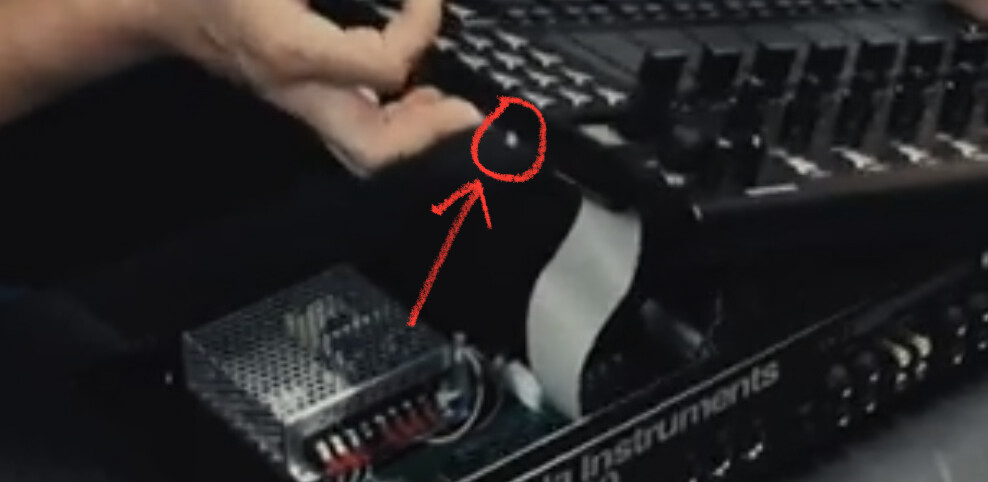
The install itself is easy peasy. The only thing to watch out for is a capacitor on the right outer edge on the print side of the top panel.. when I opened up the unit I accidentally grabbed it there and one leg snapped so I had to re-solder it to the print.
just a warning to watch out where you grab that top print, since you now know and will be mindful of this there is nothing to worry about.
1 Like
Hi there,
I sold my DSP card this morning. Both newest firmwares were installed and it was tested and working no problem on my machine prior to being carefully uninstalled (my S2400 being virtually in factory state, no sounds, plugins or anything other than the factory ones, so no risk of external software conflict of any sort there)
The new owner installed it, triple checked so presumably correctly, but the dsp card doesn’t seem to be recognized on his machine, with the mention “no DSP” on the corresponding page. He did the S2400 firmware update, but then the specific DSP firmware update is not suggested next as it should have been, and the firmware file shows up on the menu with a question mark before.
Other indications are : no sound output, blinking red LED inside (supposedly normal behaviour?) so at least it’s powered I guess, and (from short videos I saw) the fan seems to be working longer than the few seconds it did on boot up on my own machine.
What would be the culprit/procedure then ?
Hopefully that’s the correct thread, didn’t want to open a new one and clutter the feed.
I’m writing on the buyer’s behalf as he’s not too comfortable with english so it may be trickier to expose the problem. If we can’t sort this out quickly, I’ll have to get the DSP back and refund him.
Thanks in advance for your input, Rob, Brad or anyone. Let me know if opening a ticket is necessary.
sounds like the boot jumper may have been mounted so teh card is trying to boot from sd card.
have him send you a picture of it and make sure it’s either just not on or only on 1 pin.
or, more drastically, they may have connected it off a whole row or column of pins off by not being careful enough and nuked the card.
1 Like
Ah that does ring the bell, are we talking about the tiny black jumper that’s close to the front edge somewhat in the middle if recent memory serves ? I may have had it fall off while removing the card and placed it back on the two pins as (as a non techie) it seemed so obvious that’s how it should have been. Thanks a lot for the immediate reply, it might very well be as simple as that.
EDIT : it was as simple as that indeed. Let that post be a cautionary tale for future generations overlooking that jumper’s crucial role. In fairness it”s actually somewhat written right next to it on the PCB, but not everyone might be familiar with computer lingo such as “MMC”
1 Like